
Malware is one of the most serious cybersecurity threats facing businesses today. It can steal passwords, lock files, expose private data, slow down operations, and create expensive downtime. For small and mid-sized businesses, the damage can be especially hard to recover from because a single infection can affect email, accounting systems, customer records, shared files, and daily communication.
The challenge is that malware is no longer limited to obvious suspicious downloads or strange pop-ups. Modern malware can hide in memory, disguise itself as normal software, change its code to avoid detection, or spread through a simple phishing email that looks like a routine message from a coworker, vendor, bank, or delivery service.
Cybercriminals are also getting better at using trust against people. They know employees are busy. Invoices need to be opened, links need to be checked, and files need to be shared. That is why malware prevention is not only a technical issue. It is a business issue that involves tools, training, policies, monitoring, and a clear response plan.
In this guide, we will walk through seven malware threats every business should understand, how they work, why they are dangerous, and what practical steps you can take to reduce your risk. Whether you run a law firm, healthcare practice, accounting office, construction company, nonprofit, or growing professional services business, these threats can affect your team.
Recommended Articles to Read
- My Business Has Been Hacked: What to Do After a Cyberattack
- Top 10 Email Security Best Practices You Need to Implement
- What Is a Data Breach?
- What You Need to Know About Network Security Vulnerabilities
What Is Malware?
Malware is short for malicious software. It refers to any software, script, code, or program created to harm a device, steal information, spy on activity, disrupt operations, or give an attacker unauthorized access to systems.
Some malware is loud and obvious. Ransomware, for example, may display a message saying files have been encrypted and payment is required. Other malware is quiet. Spyware may run in the background for weeks while collecting passwords, screenshots, browsing activity, or customer information.
Malware can enter a business in many ways, including phishing emails, infected attachments, malicious websites, compromised software updates, weak passwords, unsecured remote access, infected USB drives, or unpatched software. Once inside, it can spread quickly across connected systems. In some cases, it may hide in the background while stealing data or preparing for a larger attack.
Why Malware Is More Dangerous for Businesses Than Ever
Businesses rely heavily on connected systems. Email, cloud storage, customer databases, accounting tools, phones, laptops, mobile devices, and shared drives all need to work together. That convenience also creates more entry points for attackers.
A malware infection can cause problems such as:
- Lost access to important business files
- Stolen customer, employee, or financial information
- Interrupted operations and missed deadlines
- Unauthorized access to email or cloud accounts
- Legal and compliance concerns
- Damage to customer trust
- Expensive recovery and forensic investigation costs
The good news is that most malware risk can be reduced with a layered approach. No single tool can stop every threat, but strong email protection, endpoint security, patching, backups, employee training, access control, and monitoring can make a major difference.
7 Malware Threats to Watch Out For
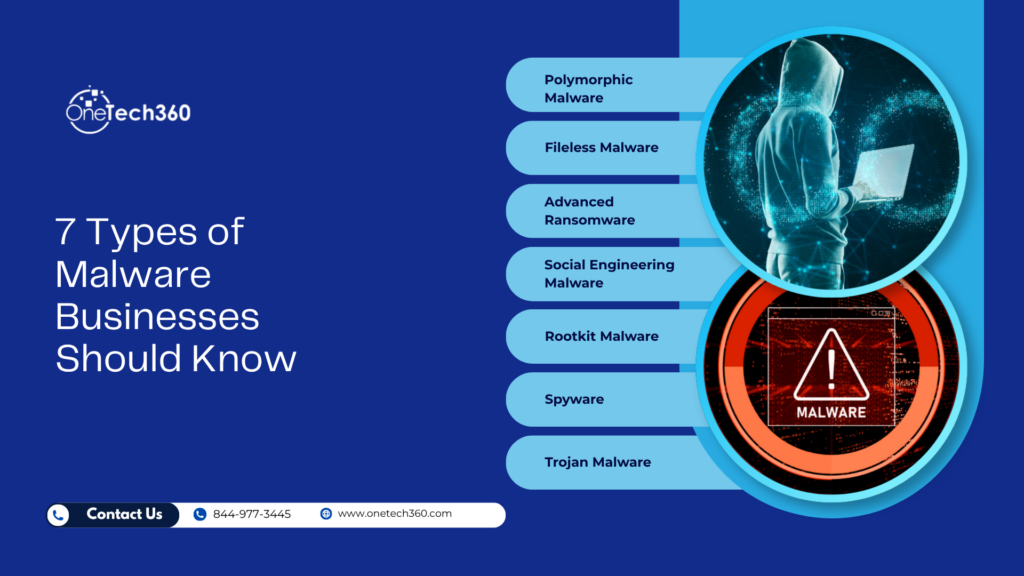
Malware continues to become more evasive, targeted, and difficult to remove. Below are seven types of malware that businesses should understand and prepare for.
1. Polymorphic Malware
Polymorphic malware is designed to change its code or appearance each time it spreads. This makes it harder for traditional antivirus tools to recognize it because the malware does not always look the same from one infection to the next.
Many older security tools depend on signatures. A signature is like a fingerprint for a known threat. When the tool sees a file that matches a known malicious pattern, it can block or quarantine it. Polymorphic malware is built to make that process harder. It may keep the same harmful function while changing parts of its code, encryption, or structure.
Think of it like a burglar who keeps changing clothes, hairstyles, and vehicles while using the same method to break into buildings. The behavior is still dangerous, but the appearance keeps shifting.
How Polymorphic Malware Works
Polymorphic malware often uses encryption and code-changing techniques to disguise itself. It may include two key parts: the encrypted malicious payload and a routine that decrypts and runs it. The malware can alter the encrypted section repeatedly, which changes the file’s visible pattern.
Attackers may also use techniques such as:
- Adding useless code that does not affect the malware’s function
- Rearranging parts of the code
- Replacing instructions with different instructions that produce the same result
- Changing variable or register usage
- Blending malicious code into legitimate-looking code
These tricks are meant to confuse security tools and delay detection long enough for the malware to spread, steal data, or install additional threats.
Why Polymorphic Malware Is Dangerous
Polymorphic malware is dangerous because it can move quickly and avoid basic defenses. A company may have antivirus software installed and still be exposed if the tool relies too heavily on known signatures.
This does not mean antivirus is useless. It means businesses need stronger protection that looks at behavior, not only file appearance. For example, if a program suddenly tries to disable security tools, access sensitive folders, encrypt large numbers of files, or contact a suspicious remote server, endpoint detection tools can flag that behavior even when the file itself looks unfamiliar.
How to Reduce the Risk
Businesses can reduce the risk of polymorphic malware by using endpoint detection and response tools, keeping software updated, limiting administrator privileges, and training employees to avoid suspicious attachments and downloads. Regular vulnerability scans and security monitoring can also help spot unusual behavior before it becomes a larger incident.
2. Fileless Malware
Fileless malware is especially tricky because it does not always rely on a traditional malicious file saved to the hard drive. Instead, it can run in memory and use trusted system tools to carry out harmful actions.
This matters because many security tools are designed to scan files. If there is no obvious file to scan, detection becomes harder. Fileless malware often abuses legitimate tools that already exist on the machine, such as PowerShell, Windows Management Instrumentation, macros, scripts, or administrative utilities.
How Fileless Malware Starts
A fileless malware attack often begins with phishing. An employee may receive an email that looks like an invoice, resume, shipping update, shared document, or urgent account notice. The message may contain a link or attachment that triggers a script when opened.
Once the user interacts with it, the malware may run directly in memory. It may then use trusted tools to connect to an attacker-controlled server, download additional commands, steal credentials, or move through the network.
Because the activity can appear to come from legitimate system processes, fileless malware may blend in with normal administrative activity. This is one reason attackers like it.
Why Fileless Malware Is Hard to Detect
Fileless malware leaves fewer traditional traces. There may not be a suspicious program sitting in a downloads folder. There may not be a simple file path to block. Instead, investigators may need to review logs, command history, network connections, memory activity, and unusual process behavior.
For businesses without advanced monitoring, fileless malware can remain hidden until it causes a larger problem. It may steal passwords, create hidden access points, or prepare the environment for ransomware.
How to Reduce the Risk
To reduce fileless malware risk, businesses should restrict unnecessary scripting tools, monitor PowerShell usage, disable macros where they are not needed, keep systems patched, and use endpoint protection that can detect suspicious behavior in memory.
Email security is also critical. Since many fileless malware attacks begin with phishing, a strong email filtering system and regular employee awareness training can block many attacks before they reach an inbox.
3. Advanced Ransomware
Ransomware is one of the most damaging malware threats for businesses. It encrypts files and demands payment in exchange for a decryption key. In many cases, attackers also steal data before encrypting it. This gives them another way to pressure the victim: pay the ransom, or the stolen data may be leaked.
Older ransomware attacks often focused on one computer. Advanced ransomware attacks now target entire networks. Attackers may spend days or weeks inside an environment before launching the final encryption stage. During that time, they may steal administrator credentials, disable backups, study the network, and identify the most valuable systems.
How Ransomware Attacks Usually Happen
Ransomware can enter through phishing emails, stolen passwords, exposed remote access tools, unpatched systems, malicious downloads, or compromised vendors. After gaining access, attackers often try to increase their permissions and move from one system to another.
The final stage may happen quickly. Employees arrive in the morning and discover that shared folders, accounting files, customer records, and business applications are locked. A ransom note appears with payment instructions, often demanding cryptocurrency.
Some ransomware groups also threaten to publish stolen data. This is known as double extortion. In more aggressive cases, attackers may contact customers, vendors, or employees to increase pressure on the business.
Why Ransomware Is So Disruptive
Ransomware does not just affect IT. It affects the entire business. Staff may not be able to access files, send invoices, process orders, schedule appointments, or serve customers. Legal and compliance issues may follow if sensitive data was exposed.
Paying the ransom is risky. There is no guarantee the attackers will provide a working key, delete stolen data, or leave the network. A safer strategy is to prevent attacks where possible and prepare recovery plans before an incident occurs.
How to Reduce the Risk
Businesses should maintain offline or immutable backups, test restoration regularly, patch systems, require multifactor authentication, limit remote access, monitor for unusual login activity, and use endpoint detection tools. It is also smart to follow ransomware guidance from trusted agencies such as CISA’s StopRansomware Guide.
Backups deserve special attention. An untested backup is only a hope, not a recovery plan. Your team should confirm that backups are complete, clean, protected from attackers, and fast enough to restore operations when needed.
4. Social Engineering Malware
Social engineering malware relies on human trust. Instead of breaking through technical defenses first, the attacker tricks a person into taking an action that helps install malware or expose credentials.
This type of malware often arrives through emails, text messages, phone calls, fake login pages, chat messages, or social media messages. It may pretend to be from a trusted source, such as a coworker, bank, software vendor, delivery company, client, government agency, or senior executive.
How Social Engineering Malware Tricks People
Attackers use urgency, fear, curiosity, or routine business pressure. A message may say an invoice is overdue, a password is about to expire, a package cannot be delivered, a bank account is locked, or a shared document needs approval.
The goal is to make the user act quickly before thinking. One click can lead to a fake login page, a malicious download, or a script that starts the infection.
Common examples include:
- Fake Microsoft 365 login pages
- Malicious invoice attachments
- Fake DocuSign or file-sharing alerts
- Messages pretending to come from executives
- Fraudulent IT support requests
- Fake software update prompts
Why Social Engineering Works
Social engineering works because people are busy and attackers are patient. Cybercriminals study how businesses communicate, then copy logos, email signatures, formatting, and language. To make messages more believable, they may also use information from company websites, social media profiles, or previous data breaches.
Even cautious employees can be fooled by a well-timed message that appears to come from a trusted person. That is why businesses should avoid a blame-first culture. Employees should feel comfortable reporting suspicious messages quickly.
How to Reduce the Risk
To lower the risk of social engineering malware, businesses should combine email filtering, security awareness training, phishing simulations, multifactor authentication, and clear verification procedures. For example, employees should know how to verify payment changes, password reset requests, and unusual file-sharing links.
Training should be practical, not overwhelming. Employees need simple rules they can remember, such as checking the sender carefully, hovering over links, questioning urgent requests, and reporting suspicious messages without fear.
5. Rootkit Malware
Rootkit malware is designed to give attackers deep, hidden control over a device or system. Once installed, a rootkit can help an attacker maintain access while avoiding detection.
The word “root” refers to high-level system access. A rootkit may hide files, processes, registry entries, network connections, or malicious activity from the user and even from some security tools. This makes rootkits especially dangerous for businesses because they can create long-term hidden access.
How Rootkits Get Installed
Rootkits may be installed through phishing attacks, malicious downloads, compromised software, exploited vulnerabilities, or attackers who already have administrator access. In some cases, a rootkit is used after another attack succeeds. For example, a phishing email may steal a password, and then the attacker uses that access to install deeper malware.
Once installed, a rootkit may allow the attacker to install additional malware, capture keystrokes, disable security software, alter system settings, or create a backdoor for later access.
Why Rootkits Are Serious
Rootkits are serious because they can undermine trust in the affected system. If a rootkit has deep enough access, it may be difficult to know whether the system is fully clean. Removing the visible malware may not be enough if hidden components remain.
In business settings, a rootkit can lead to repeated compromise. An organization may think it has solved the problem, only for attackers to return through the hidden backdoor.
How to Reduce the Risk
Rootkit prevention starts with limiting administrator rights. Employees should not use administrator accounts for daily work unless necessary. Systems should be patched, endpoint protection should be active, and suspicious privilege changes should be monitored.
If a rootkit is suspected, businesses should involve qualified IT security professionals. In some cases, rebuilding the affected system from a clean source may be safer than trying to remove the malware manually.
6. Spyware
Spyware is malware that secretly monitors activity and collects information. It may track keystrokes, capture screenshots, record browsing activity, steal login credentials, or gather financial information.
For businesses, spyware can be a quiet but serious threat. It may not immediately lock files or display warnings. Instead, it may sit in the background and collect valuable data over time.
What Spyware Can Steal
Spyware can collect many types of information, including:
- Usernames and passwords
- Banking or payment details
- Client records
- Email content
- Browser history
- Confidential business documents
- Employee information
- Authentication codes typed into a device
Some spyware includes keyloggers, which record what a person types. Other forms capture screenshots or monitor clipboard activity. More advanced versions may target specific applications, browsers, or communication tools.
How Spyware Gets Into Business Devices
Spyware can arrive through malicious websites, infected software installers, browser extensions, phishing attachments, fake updates, or compromised apps. Mobile devices can also be affected, especially if employees install apps from untrusted sources or ignore security updates.
Once spyware collects information, it may send the data to an attacker-controlled server. The stolen data can then be used for account takeover, fraud, blackmail, business email compromise, or further attacks.
How to Reduce the Risk
Businesses should use endpoint protection, mobile device management, browser security controls, patching, and least-privilege access. Employees should avoid installing unapproved software or browser extensions. Sensitive accounts should require multifactor authentication, and login alerts should be monitored for unusual activity.
It is also important to watch for warning signs. A device that suddenly slows down, overheats, displays strange browser behavior, or shows unknown extensions may need investigation.
7. Trojan Malware
Trojan malware disguises itself as something useful, harmless, or legitimate. Unlike some worms, Trojans do not usually self-replicate. They rely on users to download, install, or run them.
The name comes from the story of the Trojan horse. The threat looks safe from the outside, but once it is inside, it causes damage.
Common Types of Trojans
Trojans can serve many purposes. Some create backdoors that allow attackers to return later. Others steal passwords, download more malware, spy on users, or give attackers remote control.
Common Trojan types include:
- Backdoor Trojans, which create hidden access
- Banking Trojans, which target financial accounts
- Downloader Trojans, which install additional malware
- Remote access Trojans, which let attackers control a device
- Credential-stealing Trojans, which capture usernames and passwords
How Trojans Spread
Trojans often spread through phishing emails, fake software downloads, pirated applications, malicious ads, fake updates, and compromised websites. A user may believe they are installing a helpful tool, opening a document, or updating software, when they are actually launching malware.
In business environments, Trojans are often used as the first step in a larger attack. Once a Trojan gives attackers access, they may steal data, install ransomware, create new accounts, or move across the network.
How to Reduce the Risk
Businesses should block unauthorized software installations, use application control where practical, train employees to download software only from approved sources, and keep browsers and operating systems updated. Email attachment scanning and web filtering can also help prevent Trojans from reaching employees.
How to Tell If Your Business May Have a Malware Infection
Malware is not always obvious, but there are warning signs. A single symptom does not always prove an infection, but several signs together should be taken seriously.
Common Malware Warning Signs
- Devices become unusually slow or unstable
- Files disappear, change, or become inaccessible
- Employees see unexpected pop-ups or browser redirects
- Security tools turn off without approval
- Unknown programs or browser extensions appear
- Email accounts send messages the user did not write
- Login alerts show access from unfamiliar locations
- Shared drives show unusual file activity
- Systems connect to unknown external servers
- Employees are locked out of accounts
If your business notices these signs, it is important to act quickly. Disconnect affected devices from the network, avoid deleting evidence, preserve logs when possible, and contact your IT support team or security provider.
How Businesses Can Protect Against Malware
Malware protection works best when it includes several layers. One control may fail, but multiple controls make it harder for attackers to succeed.
Use Strong Email Security
Email remains one of the most common ways malware reaches employees. A strong email security setup should include spam filtering, attachment scanning, link protection, domain authentication, and phishing detection. Employees should also know how to easily report suspicious emails.
Require Multifactor Authentication
Multifactor authentication helps protect accounts even if a password is stolen. It should be enabled for email, cloud services, remote access, administrator accounts, financial tools, and any system that contains sensitive data.
Keep Systems Patched
Attackers often exploit known vulnerabilities. Businesses should patch operating systems, browsers, business applications, firewalls, VPNs, and mobile devices. Patch management should be consistent, tracked, and documented.
Limit Administrator Access
Not every employee needs administrator rights. Limiting privileges can reduce the damage malware can cause. Administrator accounts should be separate from everyday user accounts and protected with strong authentication.
Back Up Important Data
Reliable backups are essential for ransomware recovery and other destructive attacks. Backups should be tested regularly and protected from modification or deletion. NIST’s guidance on recovering from ransomware and destructive events is a helpful resource for businesses reviewing recovery planning.
Monitor Devices and Networks
Security monitoring helps detect unusual behavior early. This may include endpoint detection, firewall logs, login monitoring, cloud activity alerts, and vulnerability scanning. Early detection can prevent a small incident from becoming a major breach.
Train Employees Regularly
Employees are one of the most important parts of malware defense. Training should cover phishing, suspicious attachments, password safety, safe browsing, reporting procedures, and how to handle unexpected requests.
Training should happen more than once a year. Short, repeated lessons are often more effective than one long annual session.
Create an Incident Response Plan
Every business should know what to do when malware is suspected. An incident response plan should explain who to contact, how to isolate affected systems, how to preserve evidence, how to communicate internally, and how to restore operations safely.
The plan should be reviewed and tested. During an actual incident, people are under pressure. A written plan helps reduce confusion and improves decision-making.
What to Do If You Suspect Malware
If you think a business device or system may be infected, do not ignore it. Quick action can limit damage.
Take These Steps Right Away
- Disconnect the affected device from Wi-Fi and wired networks
- Do not shut down systems unless your IT team instructs you to do so
- Do not delete suspicious files before they can be reviewed
- Report the issue to your IT team or security provider immediately
- Change passwords from a clean, trusted device if credentials may be exposed
- Check whether other devices or accounts show suspicious activity
- Document what happened, including times, messages, files, and user actions
Fast reporting matters. Even if it turns out to be a false alarm, it is better to check early than to discover later that malware spread across the network.
Why Malware Prevention Needs Ongoing Attention
Malware threats keep changing because attackers adapt. As businesses improve email security, criminals test new phishing methods. Better antivirus tools push malware authors toward fileless or polymorphic techniques, while stronger backups often lead ransomware groups to add data theft and extortion.
That is why malware prevention is not a one-time project. It needs ongoing review, regular updates, and clear ownership. Businesses should ask:
- Are our systems patched?
- Are employees trained to spot suspicious messages?
- Are our backups tested and protected?
- Do we have visibility into endpoints and cloud accounts?
- Are administrator accounts limited and monitored?
- Do we have a tested response plan?
- Would we know quickly if malware entered our network?
These questions help turn malware protection from guesswork into a practical business process.
Stay Prepared, Not Panicked
Malware is a serious threat, but businesses are not powerless. By understanding how threats like polymorphic malware, fileless malware, ransomware, social engineering malware, rootkits, spyware, and Trojans work, leaders can make better decisions about protection.
The strongest defense combines people, process, and technology. Employees need training, systems need updates, and accounts need strong authentication. Devices also need monitoring, backups need testing, and leaders need a clear response plan before an incident happens.
Cybersecurity does not require panic. It requires preparation. When your business knows what to watch for and has the right support in place, malware becomes a manageable risk rather than a constant source of uncertainty.
If you are unsure whether your current protections are enough, now is a good time to review your security tools, backup strategy, employee training, and incident response plan. A proactive review can uncover gaps before attackers find them.
Need Help Protecting Your Business from Malware?
Malware protection is easier when you have the right team watching your systems, securing your accounts, and helping employees avoid common threats. If your business needs help improving cybersecurity, reviewing backups, strengthening email security, or building a clear response plan, Onetech360 can help.
Contact Onetech360 today to discuss practical ways to protect your business from malware, ransomware, phishing, spyware, and other cybersecurity threats.